Check your application status
Follow your application on the page linked from your confirmation email, or under Applications in your dashboard.
Where to see it
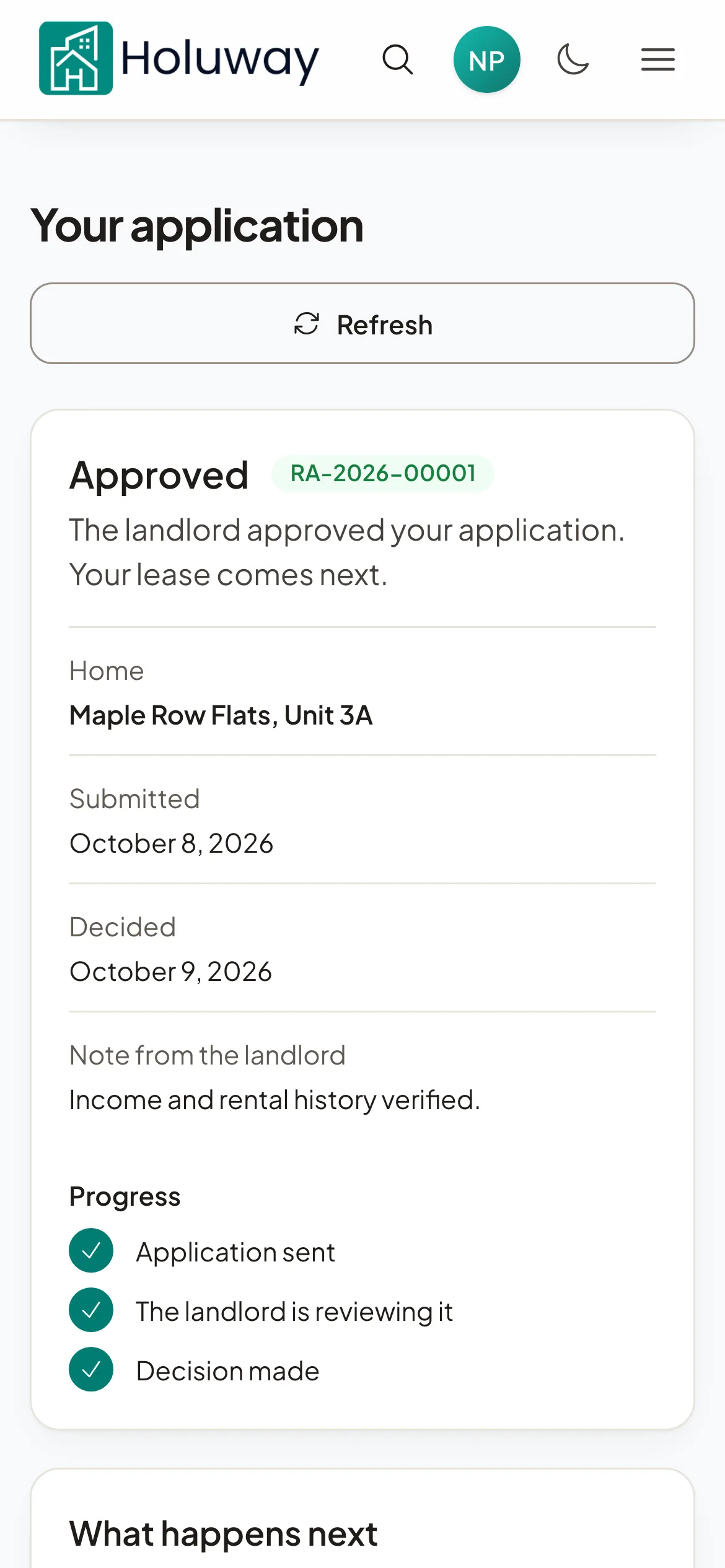
Your confirmation email links to your application's page. It opens without signing in, so keep the email. Select Refresh there to see the latest.
Signed in, Applications lists every application with its status, the date you applied and any note from the landlord. Select See status and next steps on one to open its page, where you can pay a fee and follow its progress.
What each status means
| Application's page | Applications | What it means |
|---|---|---|
| Sent to the landlord | Submitted | The landlord has your application and will review it. |
| Being reviewed | In review | The landlord is looking at it now. |
| Approved | Approved | The landlord approved it. Your lease comes next. |
| Your lease is ready to sign | Lease ready | The landlord sent your lease. Review and sign it. |
| Lease signed | Lease ready | You and the landlord both signed. |
| Not approved | Not accepted | The landlord did not approve this application. |
| Withdrawn | Withdrawn | This application was withdrawn. |
The page also shows Progress and What happens next, any Conditions of approval, and the landlord's phone and email.
After a decision
We email you when the landlord decides. If you applied without an account, the page asks you to Create your account with the email you applied with, because your lease is sent to that account.
When your lease is ready, select Review and sign. Once both sides have signed, the page offers View your lease and, if your property has one, Open your resident portal.